
If your sublimation print is not transferring properly, the most common reasons are incorrect temperature, wrong pressure, low polyester content, poor sublimation paper placement, or unsuitable substrates. The good news is that most sublimation transfer problems can be fixed with a few simple adjustments.
If you are new to this process, it’s important first to understand what sublimation printing is and how it works to avoid common mistakes.
Quick Answer: Why Is My Sublimation Not Transferring Properly?
Your sublimation may not be transferring because of:
• Incorrect heat press temperature
• Too little or too much pressure
• Low polyester content in the fabric
• Wrong side of sublimation paper
• Moisture in the substrate
• Paper shifting during pressing
• Poor-quality sublimation ink or paper
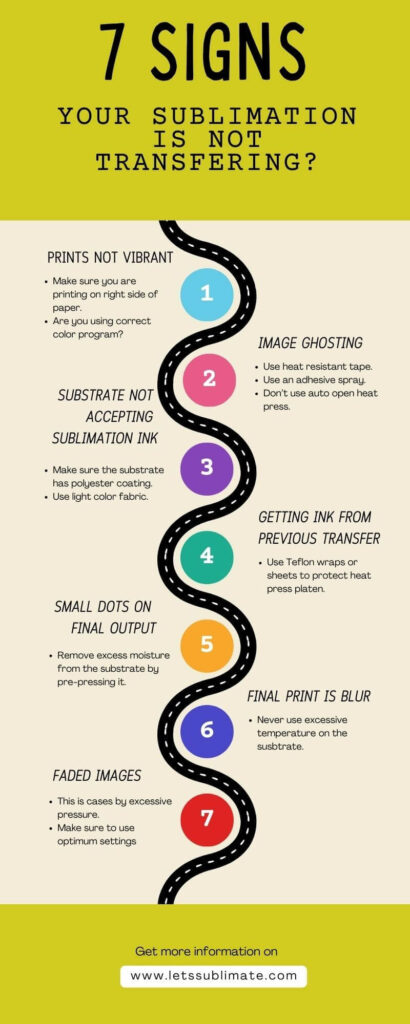
Problem 1 – Sublimation prints are not vibrant
If your outcome is faded or dull, the issue is usually due to poor ink transfer or an incorrect temperature.
How to fix this issue?
- Avoid under-pressing or over-pressing.
- Check the sublimation printer color settings.
- Always use the correct side of your sublimation paper.
- Ensure you use the correct temperature for your substrate.
Problem 2 – Printed image ghosting
Ghosting occurs when the sublimation transfer paper shifts during pressing, creating a shadow effect.
How to fix this issue?
- For better stability, always use butcher paper.
- Lift the heat press straight up soon after pressing.
- Do not move the substrate while it is still hot.
- Always use heat-resistant tape to secure your transfer paper.
Problem 3 – The substrate is not accepting sublimation ink
Remember, sublimation only works for polyester and polymer-coated surfaces. If you are using a different substrate, there will be issues with printing.
How to fix the issue?
- Make sure the surface you are going to print on is compatible with sublimation.
- Select proper sublimation blanks.
- Avoid untreated or cotton surfaces.
- Use a substrate having at least 65% polyester (preferably 100%)
Problem 4 – ink is transferring from the previous pressing
It happens when sublimation ink from a previous design transfers to your new substrate.
How to fix the issue?
- Do not use contaminated sublimation paper.
- Make sure to clean your heat press regularly.
- Place a sheet of butcher paper above and below your design.
- Make sure to use a clean protective sheet while printing.
Problem 5 – Small dots appear in the final print
Usually, small dots appear due to moisture or dust on the surface.
How to fix the issue?
- Do not touch the surface before pressing.
- Always work in a clean environment.
- Make sure to pre–press the substrate to remove moisture.
- Use a lint roller before pressing.
Problem 6 – Blurry sublimation results
Generally, a blurry print occurs due to any movement or incorrect pressure.
How to fix the issue?
- Follow the proper pressing time.
- Ensure even pressure across the substrate.
- Do not shift the design while pressing.
- Apply medium to firm pressure.
Problem 7 – Faded sublimation images
You get faded images due to poor-quality ink and low temperatures.
How to fix the issue?
- Avoid overpressing
- Ensure the right pressing time.
- Use high-quality sublimation ink.
- Increase temperature slightly (within recommended range)
Checklist before Re-Pressing your Sublimation Designs
Before trying again, you should check below
- Is the transfer paper secured properly?
- Is your substrate clean and dry?
- Is the heat press fully preheated?
- Is the substrate polyester or polymer-coated?
- Is your transfer paper placed upside down?
- Are time and temperature settings correct?
Special Note for Mug Sublimation Problems
Issues during sublimation of a mug often occur due to uneven pressing or incorrect heat-press settings. Some common causes are
- Presence of moisture inside the mug coating.
- Incorrect temperature settings.
- Uneven pressure around the mug surface.
To avoid these issues, make sure the mug press is calibrated correctly, and always preheat the mug before transferring the design.
Recommended Sublimation Time and Temperature Settings
According to my years of experience, here is the list of optimum time and temperature settings for multiple substrates. As a beginner, you can use this table for your reference. However, I suggest you do a sample test and adjust the settings a bit to achieve the desired outcome.
Note – These settings are general starting points. Heat presses and substrates can vary, so always test on a sample first before pressing your final design.
| Substrate | Time (°F) | Temperature (Seconds) |
| Canvas garments | 365 | 40 |
| Key chains | 330 | 15 |
| Caps | 360 | 30 |
| Mouse pads | 380 – 400 | 45 |
| Polyester fabric (100%) | 400 | 45 |
| Ceramic mugs | 350 – 400 | 150 – 200 |
Recommended Tools to Fix Sublimation Transfer Problems
Many sublimation transfer issues can be prevented by using the right equipment and accessories. These tools help improve transfer quality and reduce common problems like ghosting, faded prints, and uneven pressure.
Heat Press Machine
Recommended models
• Fancierstudio 15×15 Heat Press
• PowerPress Industrial Heat Press 15×15
• Cricut EasyPress 2
A reliable heat press helps maintain even temperature and pressure, which is essential for proper sublimation transfer. A good heat press ensures the sublimation ink turns into gas properly and bonds with the substrate surface.
Heat-Resistant Tape
Popular options
• Cricut Heat-Resistant Tape
• HTVRONT Heat Tape
• YRYM HT Heat Transfer Tape
Heat-resistant tape keeps the sublimation paper securely in place during pressing. This helps prevent paper movement and ghosting issues. Always secure the edges of your transfer paper before pressing to avoid image shifting.
Sublimation Paper
Popular options
• A-Sub Sublimation Paper
• Hiipoo Sublimation Paper
• Printers Jack Sublimation Paper
High-quality sublimation paper helps ensure proper ink release and vibrant color transfer. Using poor-quality paper can cause faded prints or incomplete transfer.
Lint Roller
Recommended options
• Scotch-Brite Lint Roller
• Amazon Basics Lint Roller
• Evercare Pet & Fabric Lint Roller
A lint roller helps remove dust, fibers, and debris from fabric before pressing. Even tiny fibers can affect sublimation transfer and cause small dots in the final print.
Teflon Sheet or Butcher Paper
Recommended options
• PTFE Teflon Heat Press Sheets
• Cricut Protective Teflon Sheet
• Sublimation Butcher Paper Sheets
Teflon sheets or butcher paper help protect your heat press and prevent ink bleeding onto the heat platen. Always place a protective sheet above and below the design during pressing.
Beginner Tip
If you are still struggling with results, go through this step-by-step beginner’s sublimation printing guide to understand the process in detail.
Conclusion
If your sublimation prints are not transferring properly, then the issue is generally related to material compatibility, pressure, and temperature. The key is to identify the exact issue and adjust the settings accordingly. Slight changes in pressure, temperature, and paper placement can make a huge difference in the outcome. Once you understand the basics of sublimation, printing designs will become much easier and more consistent. If you are still struggling, go through the checklist above and test the settings on a sample before proceeding to the final design.
Frequently Asked Questions
Q – Can you heat press the transfer more than once for a proper transfer?
No, you should never heat press the transfer more than once as the transfer paper is made to heat press only once. During initial pressing your design has already made the bond with the fabric. If your will press it again then the heat will damage the already printed design.
Q – Is sublimation printing difficult process?
No, sublimation is not difficult, but it is tricky. You will need practice and time to master the process, but once mastered you will be able to print on any substrate (compatible with dye- sub printing) easily.
Q – Why is my sublimation not sticking to the shirt?
This usually happens when the fabric has low polyester content. Sublimation works best on polyester fabrics or polymer-coated substrates.
Q – Can I sublimate on cotton?
Sublimation does not bond well with cotton because the ink requires polyester fibers or polymer coating to attach permanently.
If you found this guide helpful, you can explore more sublimation tutorials and beginner guides on LetsSublimate to improve your printing results step by step.




Very rapidly this website will be famous among all blogging viewers, due to it’s fastidious content
I am regular visitor, how are you everybody? This post posted at this site is really good.
A person essentially lend a hand to make severely articles I’d state.
This is the first time I frequented your website page and thus far?
I surprised with the analysis you made to create this actual put up amazing.
Fantastic job!
Greate article. Keep writing such kind of info on your
page. Im really impressed by your site.
Hi there, You have performed an incredible job. I will certainly digg
it and in my opinion recommend to my friends. I am sure they will be benefited from this website.
Great post.
You made some good points there. I looked on the internet for the issue and found most guys will approve with your blog.
Keep this going please, great job!
Thanks very interesting blog!