
If you have just begun your sublimation journey and are worried if your transfers will come out vibrant or not, then don’t worry.
Few years back when I started my printing, I faced multiple issues due to which my prints were not coming right. I utilized many resources to know the reason.
During my learning phase, I did lots of experiments, and after hours of learning, I was able to print correctly. However, I wasted multiple resources while mastering the skills, which was on the expensive end.
If you are new to sublimation printing, following the right sublimation tips for beginners can save time, money and effort. Many beginners struggle with faded prints, ghosting, wrong temperature settings and poor material selection. These practical sublimation printing tips will help you get vibrant and professional quality results from the start.
Quick Sublimation tips for beginners
| Step | Tip | Why Important |
| 1 | Use polyester or polymer coated substrate | Ensure proper ink bonding |
| 2 | Use high quality sublimation ink | Gives vibrant colors |
| 3 | Choose good sublimation paper | Improves transfer quality |
| 4 | Use butcher paper while pressing | Protects heat press |
| 5 | Apply correct time and temperature | Prevents faded prints |
| 6 | Use mirror image setting | Ensure correct design output |
| 7 | Use lint roller before pressing | Avoids blue dots |
| 8 | Secure design with heat tape | Prevents ghosting |
| 9 | Do test print before final print | Avoid material wastage |
| 10 | Keep printer regularly maintained | Prevents banding issue |
Tips for successful sublimation for beginners
1. Select right substrate
This is a common mistake done by beginners. I have seen people who are in the initial phase of their journey choose the blanks which are not polymer coated. Due to which they are unable to transfer colors properly.
Substrate should be the right material as your ink will make a bond with its fiber. While selecting the substrate you should choose the product which has polymer coating on it or is made from polyester fabric.
Alway check your substrate before printing if it is made to accept dye – sub ink or not. There are mugs, cotton shirts, glass plates, bag etc. available in market for sublimation but are not polyester coated. So, you should first coat them with polyester and then follow transfer process.
2. Use good quality printing ink
Using high quality ink is important for getting long lasting and vibrant prints. Poor quality ink will generate dull colors which will fade over time.
Quick Tip
Before blaming your heat press or paper, first check your substrate and ink quality. In many beginner projects, these two things cause most transfer problems.
3. Invest in high-quality sublimation paper
Sublimation paper is actually a carrier sheet which holds the ink before it is actually transferred to the material. Get the transfer paper, which is specially designed to work with your substrate and printer.
Do not invest in too thick or too thin transfer paper as it will result in poor quality. Always select the paper compatible with your material and printer.
4. Always use butcher paper
Using butcher paper while sublimating is the best way to protect your heat press from getting extra ink, which may transfer to other projects. The butcher paper will absorb the ink before it reaches the platen of the heat press.
When the ink is heated, it becomes a gas, and it can really cause issues if it reaches the pressing surface. To get a non-coated and non-waxy butcher paper to keep the heat press clean.
Quick Tip
Using cheap sublimation paper can lead to dull prints, while skipping butcher paper can transfer excess ink onto your heat press. Good paper and surface protection save both time and money.
5. Printer settings
It is quite common to have color issues when you are beginning your first few projects of sublimation. In order to produce the best results, you should change printer settings. The common printer settings which everyone should follow is to turn on print quality option to high and second is to turn off high speed print option.
If you do not get these settings options on your sublimation printer then you should reinstall the drivers. After reinstalling the drivers you should have these settings done to get beautiful prints.
6. Printing your sublimation design
After tweaking your printer settings you need to think about the platform from where you will print your designs. You should choose a program which offers vibrant colors and uses genuine amounts of ink. Means there should not be ink wastage.
I suggest using graphic design softwares like Adobe Illustrator, Canva, Inkscape etc to create your artwork. These platforms are designed to work with vector and high DPI images for generating best quality prints.
Quick Tip
Always print one sample design first and check colors, sharpness and alignment before printing multiple copies. A test print helps you catch mistakes early.
7. Knowing the right temperature and time
For transferring your beautiful artwork on the substrate you need to place transfer paper and your blank in the heat press and apply right pressure, temperature and pressure to transfer the design.
However, if your heat press time, temperature and pressure settings are not right, then you may ruin your design and will get a bad quality final print. Make sure to check the manufacturer’s website to get the right settings for the heat press.
8. Most useful tip – Be kind to yourself!
This is a very useful tip which reminds you to be kind to yourself. We all make mistakes, ruin multiple projects and face some failures. Which is OK and that is how we all learn. Even after four years of experience I mess up sometimes.
Whether you forget to mirror an image, burn your project, press it wrongly, it is OK! Always remember that no one is perfect and we all learn from mistakes. You should always take a step back and forgive yourself!
Quick Tip
Sublimation takes practice. Even if your first few prints fail, note the temperature, time and pressure settings you used. These records will help you improve much faster.
Tricks you should not miss as a beginner
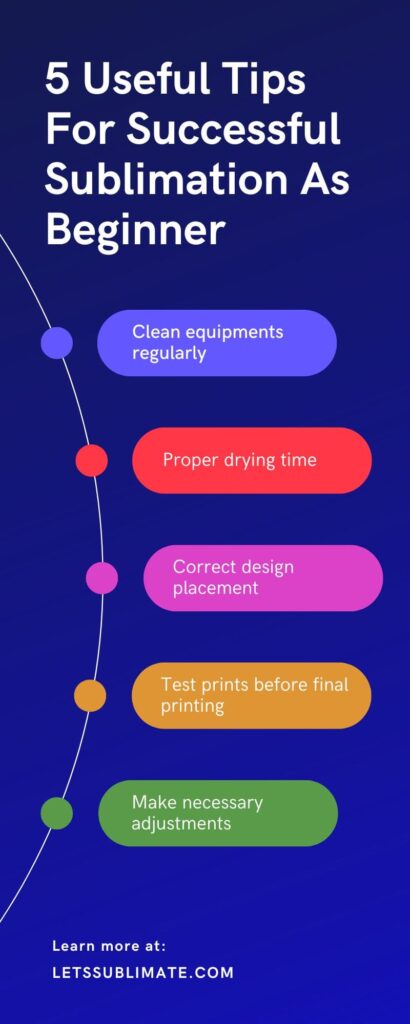
Here are some amazing tricks which you should not miss as a beginner.
1. Clean equipments
Always clean all equipment regularly as it will help you to maintain longevity and will also make sure that you are getting best possible results. For cleaning instructions you can follow the manufacturer’s instructions.
2. Drying time
According to substrate, drying time may vary and you should always allow sufficient drying time before passing it for final printing. It will avoid smudging of transfer issues.
3. Design placement
Always be mindful of the placement of your design on the material you are printing. Most of the designs may not look great in certain placements or they may get distorted if they are placed too close to the edge of the substrate.
4. Test prints
Always test your designs on waste pieces of your substrate before beginning the final product as it can help you to identify any issue.
5. Quality control
Always inspect the final product and make required adjustments if needed. Save these settings as it will help you to save time in future.
Common mistakes beginners should avoid
| Mistake | Result |
| Using cotton fabric | Design will not transfer properly |
| Low temperature | Faded print |
| Moving paper during pressing | Ghosting |
| Not using mirror image | Reversed design |
| Using low quality ink | Dull colors |
Recommended tools for beginners
Using correct tools helps beginners to avid common sublimation printing mistakes like color mismatch, ghosting, faded prints and transfer issues. Use of high quality equipment improves durability, consistency and print clarity.
Here are beginner-friendly sublimation tools which provide reliable results and are popularly used in sublimation printing process.
Sublimation Printer
Good quality sublimation printer ensures correct color output, consistent print quality and smooth ink flow. Newbie should choose printers which are easy to set up and maintain.
Recommended options
Here are some options I recommend
Epson EcoTank L3250
It is a budget-friendly option best for beginners starting sublimation printing at home. It produces vibrant prints and consumes less ink.
Epson SureColor F170
It is a dedicated sublimation printer specially designed for sublimation printing. It offers professional quality prints and excellent color accuracy.
Note – These printers are best for beginners, home business and small printing.
Sublimation ink
High-quality sublimation ink plays a major role in achieving sharp, bright and long-lasting prints. Poor quality ink can cause fading or dull colors after washing.
Recommended options
Here are some options I recommend
Hiipoo sublimation ink
Using this ink will produce vibrant colors and smooth transfer results. It is aslo compatible with various Epson printers.
Printers Jack sublimation ink
This ink is known for strong color output and good compatibility with sublimation paper.
Note – These ink are best for long lasting design quality and vibrant prints.
Sublimation paper
Sublimation paper holds the printed design and release ink efficiently during the process of heat press. Using correct paper reduced ghosting and improves color accuracy.
Recommended options
Here are some options I recommend
A-Sub sublimation paper
This is a fast drying paper which produces sharp and clear prints. It is ideal for beginners.
Koala sublimation paper
It provided consistent transfer quality and good ink absorption.
Note – These papers are best for color transfer and also reduce smudging.
Heat Press machine
A heat press machine is used to apply right amount of heat and pressure for transferring design from paper to the substrate. Even temperature distribution helps to prevent uneven and faded prints.
Recommended options
Here are some options I recommend
F2C heat press machine 12×15 inch
It is beginner friendly heat press and is suitable for mugs, flat surfaces and T-shirts.
PowerPress heat press machine
It provides stable temperature and uniform pressure for professional quality transfer.
Note – These machines are best for even pressure and consistent transfer results.
Heat resistant tape
Heat resistant tape helps to hold sublimation paper in place during heat pressing. It aslo prevents paper movement and also reduce ghosting effect.
Recommended options
Here are some options I recommend
YEQIN heat resistant tape
This is strong adhesive tape which can withstand high temperature without leaving residue.
Note – It helps to prevent ghosting and blurry design.
Lint roller
Fibers and dust particles on the surface of substrate can cause white spots or blue dots after heat transfer. Using lint roller can ensure clean surface before pressing.
Recommended options
Here are some options I recommend
Scotch Brite lint roller
It effectively removes dust, small particles and lint from fabric surface.
Note – It helps to avoid print defects caused by dusts.
Here is a quick summary table
| Tool | Purpose | Benefit |
| Epson EcoTank L3250 | Printing design | Affordable beginner printer |
| Epson SureColor F170 | Sublimation printing | Professional print quality |
| Hiipoo Sublimation ink | Color transfer | Vibrant and long lasting prints |
| Printers Jack Ink | Ink compatibility | Consistent color output |
| A-sub Paper | Transfer sheet | Clear and sharp prints |
| Koala Paper | Ink absorption | Reduces smudging |
| F2C heat press | Heat transfer | Even pressure distribution |
| PowerPress heat press | Heat transfer | Consistent temperature |
| YEQIN heat tape | Paper holding | Prevents ghosting |
| Scotch-bright lint roller | Cleaning surface | Avoids blue dots |
Conclusion
With the help of these sublimation tips for beginners you can prepare yourself to face less failures in the initial phase of your printing journey. Follow these guidelines and if you have any questions, you can comment below or you can message me.
FAQs
Q – What is the most important tip for beginners doing sublimation printing?
The very important tip for beginners is to use right substrate material. Sublimation printing works best for polyester fabric or polymer coated surfaces because sublimation ink makes a permanent bond with polyester fibers. If material does not contain polyester coating, the design will appear faded and will not transfer at all. Beginners should also ensure correct pressure and temperature settings for best results.
Q – Why is my sublimation prints faded or dull?
Dull sublimation prints generally happen because of incorrect time settings, low temperature, wrong material selection or poor quality sublimation ink. If substrate does not contain enough polyester then the colors on outcome will not appear vibrant. You should make sure that you are using high quality sublimation ink, correct heat press settings, proper sublimation paper to achieve bright and clear prints.
Q – Can beginners use a normal printer for sublimation printing?
Many Epson EcoTank printers can be converted to sublimation printers by filling them with sublimation ink instead of regular ink. However, once the sublimation ink is used, you should not use regular ink in your printer. Beginners who wish for professional results may also consider dedicated sublimation printers like Epson SureColor F170.
Q – What type of fabric is best for sublimation printing?
Polyester fabric or poly-coated materials are ideal for sublimation printing. Light-colored polyester fabric produces vibrant results as sublimation ink becomes part of the substrate during heat transfer. Cotton fabric does not work well for sublimation unless you are using a special polymer coating.
Q – Why is my sublimation design not transferring properly?
If designs are not transferring, then common reasons include
- Incorrect heat press time settings
- Low polyester content
- Insufficient pressure
- Low temperature
Always ensure that heat press reaches required temperature and you should also apply even pressure for correct duration. Also check the sublimation paper is placed correctly and the design is also mirrored before printing.
Q – What temperature should beginner use for sublimation printing?
Many sublimation projects require a temperature between 180°C to 200°C (356°F to 392°F) for around 40 to 60 seconds. But the exact temperature and time depends on substrate being used like metal sheets, mugs, T-shirts. You should always follow manufacturer’s recommended heat settings for getting best results.
Q – Why do I see small marks or blue dots on sublimation print?
Unwanted spots or blue dots generally appear due to dust particles, presence of moisture, lint or dust particles on substrate. Before pressing, you should always clean the substrate using dry cloth or lint roller. Even small dust particles can affect the quality of final print.
Q – Do I need mirror image setting for sublimation printing?
Yes, sublimation printing needs the design to be mirrored before printing. Since the design is transferred face-down on the substrate, mirroring make sure that the final output appear correctly.
Q – Can sublimation printing be done at home?
Yes, sublimation printing can be easily done at home using a sublimation paper, sublimation printer, heat press machine and polyester coated substrates. Many beginners start sublimation printing as a small home business for customized products like key chains, phone covers, mugs and t-shirts.
Q – How can a beginner avoid common sublimation printing mistakes?
Beginners can easily avoid mistakes by
- Using correct material
- Maintaining proper heat press settings
- Performing test prints
- Using high quality sublimation tools
Beginner should also keep record of time and temperature settings for various substrates.
Q – What software is best for sublimation design?
Popular design software for sublimation printing includes CorelDraw, Photoshop, Canva and Adobe Illustrator. Beginners can begin with Canva as it is simple and easy to use. It aslo provides ready-made templates for sublimation designs.
Q – How long does sublimation prints last?
Sublimation prints last for a longer duration as the ink becomes part of the material fabric instead of sitting on the surface. When proper material and settings are used, sublimation prints do not fade, peel or crack easily even after multiple washes.



I am new to sublimation. How can I make sure my first projects turn out professional and vibrant?
I am just starting out with sublimation. What are the most important tips to avoid common mistakes and get great results?
Excellent blog!