The sublimation ghosting problem is among the most common issues beginners face while printing designs using sublimation process. Ghosting in sublimation printing can make your design look faded, blurry or create a shadow effect around the image.
If you notice a double image, blurry design or shadow outline after heat pressing, you are likely dealing with sublimation double image issue or sublimation shadow problem. The good news is that this issue can be easily fixed once you understand the cause.
In this article you are going to learn.
- Tools which help to prevent ghosting.
- How to avoid ghosting in sublimation printing?
- How to fix sublimation ghosting?
- Sublimation ghosting causes.
- What is sublimation ghosting?
This easy to understand sublimation troubleshooting guide will help you to achieve sharp and clean prints.
What Is Sublimation Ghosting Problem?
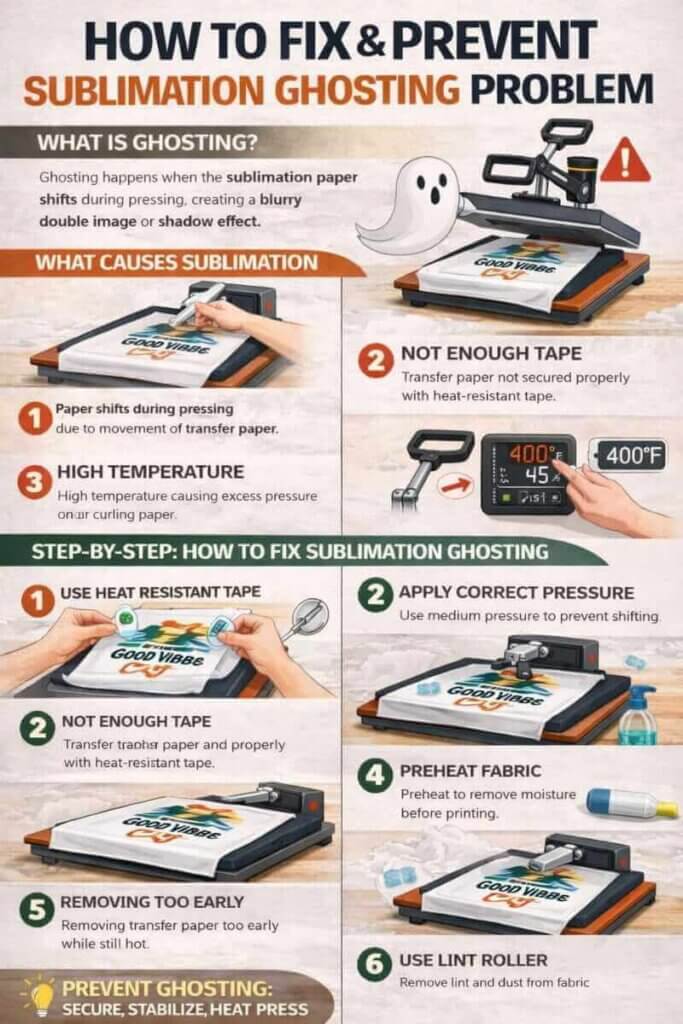
The sublimation ghosting problem happens when the transfer paper shifts slightly during the process of heat pressing. Even a small movement of paper can cause the design to print twice in slightly different position, creating shadow or blurry effect.
Ghosting in sublimation printing generally appears as
- Faded duplicate print.
- Double image effect.
- Blurry edges.
- Shadow around design.
This issue is also known as
- Blurry sublimation print.
- Sublimation double image issue.
- Sublimation shadow problem.
Ghosting generally occurs when the sublimation paper moves during pressing or when you do not take proper precaution.
How Ghosting Looks In Sublimation Printing?
Ghosting can appear in various forms based on the cause. Common signs are
- Duplicate faded design near original print.
- Unclear or blurry edges.
- Shadow effect on one side of image.
- Double outline around design or text.
Beginners generally confuse ghosting with printer quality issue, but in many cases, the problem occurs during heat pressing stage.
Ghosting is among the common sublimation printing mistake and can be easily avoided with right method.
What Causes Sublimation Ghosting Problem?
Understanding what ghosting in sublimation printing is will help you to prevent mistakes and improve the quality of print.
Here is most common sublimation ghosting causes.
Sublimation Paper Movement During Pressing
The most common reason for ghosting is movement of transfer paper during heat pressing. Even slight shifting can cause the ink to transfer twice and create a shadow effect.
To avoid the issue, it is necessary to learn how to stop sublimation paper moving during pressing.
Transfer paper movement may happen due to
- Quick lifting of heat press.
- Uneven pressure.
- Incorrect taping.
Incorrect Use Of Heat Resistant Tape
Heat resistant tape helps to secure transfer paper in place. If the transfer paper is not fixed properly, it may move during pressing.
Learning how to secure sublimation transfer paper correctly can significantly reduce ghosting issues.
Pro tip – For better stability, always secure the design with heat resistant tape.
High Temperature Or Pressure Issues
Very high temperature or pressure can sometimes cause paper movement when the heat press opens or close.
This type of issue is generally known as heat press ghosting problem.
Pro tip – Maintaining recommended temperature along with medium pressure will help to prevent design shifting.
Removing Paper Too Quickly After Pressing
Removing sublimation paper quickly while it is still hot can cause slight movement resulting in sublimation double image problem.
Pro tip – Always lift the heat press carefully and remove sublimation paper slowly.
Moisture In Paper Or Fabric
Moisture in paper or fabric can affect ink transfer and cause shadow or blurry prints.
If you notice unclear prints, you may wonder why your sublimation prints looks blurry.
Pro tip – Preheating fabric will help you to remove moisture and improve print clarity.
Wrinkles In Fabric Or Uneven Surface
Uneven surface or wrinkles in fabric may cause sublimation paper to move slightly during pressing.
Pro tip – Always ensure the pressing surface is smooth and flat before transferring design.
Poor Quality Sublimation Paper
Low quality sublimation paper can curl when exposed to heat and can cause movement and ghosting. Using the good quality sublimation paper will help you to achieve sharp results.
How To Fix Sublimation Ghosting Problem (Step By Step)
If your design shows ghosting then you should follow sublimation ghosting solutions step by step guide.
Step 1 – Use heat resistant tape properly
Secure the sublimation paper firmly with the help of heat resistant tape from each side.
Step 2 – Apply correct pressure
Use medium pressure for preventing paper shifting during pressing.
Step 3 – Preheat fabric
Preheating removes wrinkles and moisture from fabric.
Step 4 – Do not move transfer paper during pressing
Ensure the design stays fixed while heat press is applied.
Step 5 – Lift heat press carefully
Lift the heat press slowly and avoid any jerking movement.
Step 6 – Use link roller before pressing
Dust or lint particle can cause uneven pressing.
How To Prevent Ghosting In Sublimation Printing?
Preventing ghosting is always better than correcting it. Here are some simple tips on how to avoid ghosting in sublimation.
- Use flat pressing surface.
- Avoid movement during pressing.
- Pre-press the substrate to remove moisture.
- Apply medium pressure.
- Maintain correct heat press temperature.
- Use high quality sublimation paper.
- Secure sublimation paper properly with tape.
Above tips help in how to prevent ghosting when sublimating and how to improve overall print quality.
Tools Which Help Prevent Sublimation Ghosting
Using correct tools plays a crucial role in preventing sublimation ghosting problem. Ghosting generally happens when sublimation paper moves during heat pressing or when the fabric is not properly prepared before printing.
These basic tools will help stabilize the design, ensure clean ink transfer and maintain even pressure. If you will include them in your setup it will improve print accuracy and reduce common errors.
Here is how each tool help to prevent ghosting in sublimation printing.
Heat Resistant Tape
Heat resistant tape is used to secure sublimation paper properly on the substrate or fabric. It prevents the design from shifting when the heat press opens or close.
If the transfer paper moves even slightly, it can cause a shadow or blurry effect. Proper use of heat resistant tape will help you to avoid sublimation double image problem and keep the design aligned during pressing.
Teflon Sheet
Teflon sheet acts as the protective layer between sublimation paper and heat press plate. It helps in even heat distribution and also prevents direct contact between the design and heat plate.
Using a Teflon sheet also reduce the chance of paper movement caused by friction while closing the heat press.
Lint Roller
Small fabric fibers, lint or dust can create uneven surfaces which cause sublimation paper to lift slightly during pressing.
A lint roller removes dust particles from the fabric and help to maintain smooth contact between shirt and paper. This improves the print clarity and reduces chances of ghosting.
Heat Press Machine
A good quality heat press machine offers consistent pressure and temperature which is needed for accurate ink transfer.
Unstable heat press machine or uneven pressure may cause the transfer paper to shift slightly, resulting in ghosting effect. Maintaining correct temperature and medium pressure will help prevent heat press ghosting problem.
Sublimation Paper
High quality sublimation paper remains flat during heat pressing and transfers ink evenly on the fabric.
Low quality transfer paper may wrinkle or curl when exposed to heat. This increases the chance of blurry prints and design movement.
Using good sublimation paper improves print quality and reduce sublimation shadow problem.
Flat Pressing Surface
A flat pressing surface will ensure uniform pressure across design area. Wrinkle or uneven surface in fabric can result in poor ink transfer and paper shifting.
Always ensure that substrate or shirt is placed evenly before applying heat press.
Note – Using these tools together will help to improve print accuracy and prevent common mistakes, which lead to ghosting. A proper setup will not only reduce sublimation ghosting but also improve overall print quality and consistency.
Recommended Tools To Prevent Ghosting
Using the right tools plays a crucial role in reducing the sublimation ghosting problem. Ghosting generally happens when the sublimation paper shifts during heat pressing or when the pressing surface is not stable.
High quality tools will help to maintain consistent heat distribution, even pressure and proper alignment, which improves the overall print quality.
Here are some commonly used tools which will help you to reduce ghosting in sublimation printing and improve print accuracy.
Heat Resistant Tape
Using a heat resistant tape will help to avoid sublimation double image problem and ensures sharp print edges.
Here are recommended products
- YEQIN Heat Resistant Tape
- Kapton Heat Resistant Tape
Why it helps?
- Easy to remove without damaging fabric.
- Prevents blurry or shadow prints.
- Keeps design stable during pressing.
Teflon Sheet
Teflon sheet helps to reduce friction while opening the heat press, which minimizes the chances of paper movement.
Here are recommended products
- PTFE Non-Stick Teflon Sheet
- Golden Eagle Teflon Sheet
Why it helps?
- Prevents unwanted ink marks.
- Protects heat press plate.
- Ensure smooth heat transfer.
Lint Roller
Using a lint roller before pressing will help to create smooth contact between paper and fabric.
Here are recommended products
- IKEA BASTIS Lint Roller
- Scotch-Brite Lint Roller
Why it helps?
- Improves design clarity.
- Reduces chances of shadow effect or blue dots.
- Removes dust particles.
Sublimation Paper
Using a reliable sublimation paper will help to maintain design sharpness and reduce sublimation shadow problem.
Here are recommended products
- Koala Sublimation paper
- A-Sub Sublimation paper
Why it helps?
- Produces sharper image quality.
- Reduces paper curling.
- Improves ink transfer.
Heat Press Machine
A good heat press machine offer even pressure and stable temperature across the design surface. Uneven pressure can cause transfer paper to move slightly resulting in ghosting.
Maintaining correct temperature and pressure will help to prevent heat press ghosting problem.
Here are recommended products
- VEVOR Heat Press machine 12×15
- F2C Heat Press Machine 12×15
- PowerPress Heat Press Machine
Why it helps?
- Improves transfer accuracy.
- Maintains stable temperature.
- Provides consistent pressure.
Flat Pressing Mat
Flat pressing mat offers even surface under the fabric during heat pressing. Uneven surfaces can create gaps between fabric and paper, which increases risk of ghosting.
Here are recommended products
- Cricut EasyPress Mat
- Silicone Heat Press Mat
Why it helps?
- Reduces fabric wrinkles.
- Supports even heat distribution.
- Provides uniform pressure.
Note – Using quality tools improves alignment of sublimation paper and will help to prevent design shifting. A proper setup significantly reduces sublimation ghosting and ensures professional, clean printing results.
Common Sublimation Mistakes That Cause Ghosting
Most of the beginners face sublimation ghosting problem because of small mistakes during the heat press process. Even minor errors can cause sublimation paper to shift slightly, resulting in shadow or blurry prints.
Here are some common sublimation printing mistakes which lead to ghosting.
- Not Taping Sublimation Paper Properly
If sublimation paper is not secured properly, it may move when the heat press opens or close. Even a slight movement can create a double image effect.
Using heat resistant tape properly will help to keep the design stable.
- Using Too Much Pressure
Excess pressure can cause the transfer paper to shift slightly when placed in heat press. Medium pressure is generally recommended for various sublimation projects.
Balanced pressure will help to prevent ghosting in sublimation printing.
- Using Very High Temperature
Very high temperature can cause sublimation paper to expand or curl, which can increase the chances of movement.
Maintaining recommended temperature will improve print clarity and reduce the shadow effect.
- Not Preheating Fabric
Fabric generally contains wrinkles or moisture which may affect ink transfer. Preheating fabric for few seconds can remove moisture and create smooth surface for better printing experience.
Pre pressing prevents blurry prints.
- Lifting Heat Press Quickly
Opening heat press quickly can disturb the sublimation paper position. It can cause the design to print twice in slightly different position.
Always lift heat press carefully and slowly.
- Using Wrinkled Fabric
Wrinkles can create uneven surface which prevents proper contact between fabric and paper. It can also increase chances of shifting during pressing.
Smooth fabric surface improves print accuracy.
- Using Low Quality Sublimation Paper
Low quality paper can curl when exposed to heat. Curled paper can move slightly during pressing can cause ghosting effect.
Using good sublimation paper can improve transfer consistency.
Avoiding these mistakes will help you to reduce sublimation ghosting and improve overall printing results. You should follow the correct process to ensure clear, professional and sharp prints.
Quick Checklist To Avoid Ghosting (Beginner Friendly)
Follow below checklist to fix sublimation ghosting problem.
- Use flat pressing surface.
- Use quality sublimation paper.
- Avoid medium pressure.
- Use lint roller.
- Pre-press fabric.
- Use heat resistant tape.
This checklist will ensure consistent printing results.
Conclusion
The sublimation ghosting problem is very common but easy to fix with correct technique. Most ghosting issues occur due to movement of sublimation paper during heat pressing.
By understanding these causes and following correct steps, you can easily prevent shadow and blurry prints.
Using proper tools, securing the design properly and maintaining correct pressure will ensure professional and clean results.
With practice you can avoid ghosting in sublimation printing and can achieve high quality prints easily.
FAQs
Q – Why does my sublimation print have a shadow?
If your prints are showing a shadow effect, it means the design have moved slightly during heat pressing. This is a very common reason of why does my sublimation print have a shadow.
Securing the transfer paper properly and applying correct pressure will help to prevent the issue.
Q – How to fix blurry sublimation print?
Blurry prints generally occurs due to uneven pressure, moisture and paper movement.
To understand how to fix blurry sublimation print, ensure
- Correct pressure is applied.
- Fabric is preheated.
- Paper is taped properly.
Q – How to stop sublimation paper moving during pressing?
You can stop sublimation paper movement by using heat resistant tape from various sides. Press the design properly and avoid shifting the paper after heat press closes.
Q – Is ghosting common in sublimation printing?
Yes, ghosting is very common for beginners.
Once you have understood the correct tools and process, the issue can be easily avoided.