If you are wondering how to use a sublimation paper correctly then this step by step beginners guide will help you to achieve perfect prints every time. From printing to heat pressing you are going to learn complete process in simple way.
What do you need before using a Sublimation Paper?
Before starting, make sure you have
- A design software like Canva or Photoshop
- Heat – resistant tape
- Polyester fabric or a coated surface
- Heat press machine
- Sublimation Printer with high quality Sublimation ink
- Sublimation Paper
But if you’re new, first understand what sublimation paper is and how it works before starting.
Types of sublimation paper
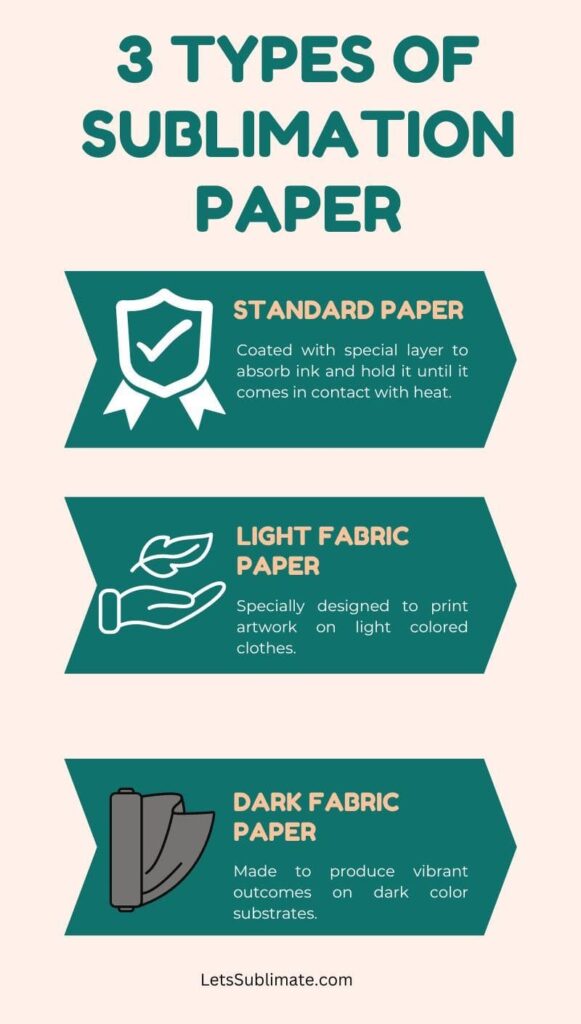
There are multiple transfer papers available and each of them have its unique usage and characteristics. Here are three common types of paper you can use.
1. Standard paper
This type of heat transfer paper is coated with a special layer which absorbs ink and holds it until heat is applied during the process of transfer. Upon applying heat, the ink turns into gas and becomes one with polymer coating or polyester on the substrate.
This paper comes in various sizes and weight and the quality also varies based on brand and manufacturer. It is mandatory to choose the heat paper which is compatible with the printer and also meets the specific printing needs.
It is necessary to follow the manufacturer instruction for the heat press transfer time, printer settings and temperature for best results.
2. Light fabric paper
Light fabric paper is also known as light colored paper is the specific type of transfer paper designed for printing artwork on light – colored or the white fabrics. It is optimized to produce the high – quality and vibrant prints on the light – colored textiles.
Light fabric paper has a special coating which allows it to hold the sublimation ink effectively and release it on the fabric during the heat transfer process. This coating is designed to prevent the ink from bleeding or smearing, ensuring detailed and crisp outcome.
While using the light fabric paper, it is important to make sure that the fabric you are printing on is right for sublimation. This printing technique works best on polyester – blend or polyester fabrics as the ink bonds with the fibers of polyester to create the vibrant and permanent prints.
3. Dark fabric paper
Dark fabric paper also known as dark colored sublimation paper is a special type of transfer paper which is designed for printing on dark fabric. Unlike standard transfer paper or light fabric transfer paper, dark fabric sublimation paper is mainly formulated to produce opaque and vibrant prints on dark materials.
The key characteristic of the dark transfer paper is its ability to offer a light or white colored base layer under the dye – sub ink. The base layer acts as the primer and allows color to appear vivid and vibrant on dark fabrics.
It makes sure that dye – sub inks are not affected by the color of fabric and results in detailed and opaque prints.
While using dark fabric transfer paper, it is critical to select the fabric which has a high polyester content.
Here is a quick comparison of different types of sublimation paper to help you choose the right one for your project:
| Sublimation Paper Type | Best Use Case | Main Benefit |
| Standard Paper | Everyday Sublimation projects | Balanced performance and easy to use |
| Light Fabric Paper | White or light colored fabrics | Produces bright and vibrant prints |
| Dark Fabric Paper | Dark colored fabrics | Creates visible and opaque designs |
Note – Choosing the right type of sublimation paper depends on your material, fabric color, and printing needs.
How to use sublimation paper? – Complete process
The printing process includes various steps which are
1. Design creation
First create or choose a design using a graphic design software. Your design can include text, graphics and images.
2. Printing
The design is then printed on the transfer paper using sublimation printer.
3. Preparing substrate
The substrates need to be prepared for the design transfer process. For fabrics, it is mandatory to ensure that they are made of polyester, or they should have high content of polyester as the dye – sub ink bonds well with polyester fabric. The material should also be clean and free from contaminants or dust which could affect the transfer.
4. Transfer setup
The printed paper is then placed on the substrate with the printed side facing downwards. The transfer paper is properly aligned to make sure the design is positioned properly.
5. Heat transfer
Prints on substrates are achieved using the heat press machine. The heat press is equipped with heated platens which apply both pressure and heat to the material.
The time, temperature and pressure settings may vary based on specific equipment and materials being used.
6. Sublimation process
When the heat press is closed and fully activated the transfer paper and the substrate are pressed together. The heat from the heat press causes the ink on the paper to convert into gas without turning into a liquid state. This gas then penetrates into the fiber of the material.
7. Ink bonding
As soon as the material cools down, the ink gas molecules harden and make a permanent bond with the polyester fibers. This makes a permanent and vibrant print which becomes an integral part of the material.
8. Finished product
When the heat transfer process is finished, the material is allowed to cool down before removing the transfer paper. You will get a colorful, high – quality and durable print with amazing resolution and details.
For better understanding, you can also read my detailed guide on what sublimation paper is and how it works.
Common mistakes while using a Sublimation Paper
Here are some common mistakes paper make while using a Sublimation Paper
- Using a low polyester fabric
- Working with incorrect temperature and pressure settings
- Printing on wrong side of paper
- Using regular printer instead of a Sublimation Printer
- Not securing your paper properly (Ghosting issue)
💡 Pro Tip 1: Always do a test print on a small sample before final printing. This helps avoid wasting materials.
💡 Pro Tip 2: Always mirror your design before printing. This ensures the final output appears correctly after heat transfer.
Best temperature and time for sublimation
Ideal time and temperature for sublimation is
- Temperature – 180 to 200°C
- Time – 40 to 60 seconds
- Pressure – Medium
Note – These settings may vary based on the material and printer. Check out my detailed guide on sublimation time and temperature.
How to choose best Sublimation paper?
- Choose paper based on the fabric you are working with (light or dark).
- Check GSM of the paper (100 – 200 GSM works best).
- Ensure the compatibility with your printer.
- Look for fast – drying paper for getting better results.
Tips for achieving best results
Here are some tips which I follow to get the best results while using the transfer paper.
- Always follow manufacturer’s guidelines for the transfer paper and heat press machine.
- Provide sufficient time for the ink to completely transfer on the item.
- Always align the image properly on the substrate.
- Always use high quality ink and paper.
- Make sure to use optimum pressure and temperature settings for the heat press.
Best Sublimation tools for beginners (My Top Recommendations)
If you are looking for prefect sublimation results, then using right tools makes a huge difference. Here I recommend some beginner – friendly products based on reliability and performance.
Best Sublimation Printer
Epson EcoTank L3250 (Converted for Sublimation Printing)
- Gives excellent color quality.
- Budget – friendly and beginner – friendly.
- Widely used for Sublimation
Best Sublimation Paper
A-Sub Sublimation paper (120 GSM)
- Works well with most sublimation printers.
- Quick drying and minimum smudging.
- High ink absorption for vibrant prints.
Best Heat Press Machine
Generic 5-in-1 Heat Press Machine (Best for multipurpose Sublimation)
- Ideal for small business or home setup.
- Adjustable pressure and temperature.
- Can print on plates, caps, mugs and t-shirts.
Must have accessories
Heat resistant tape
- Avoids ghosting issues.
- Prevents paper movement during heat press.
Teflon sheet
- Ensures even heat distribution.
- Protects your design and heat press machine.
Conclusion
How to use sublimation paper in the printing process is very important. You should always choose the paper wisely according to substrate and follow the above steps to print the designs. If you have any suggestions, let me know in the comments or you can message me directly.
Faqs
Still have questions about how to use sublimation paper? Here are some common doubts answered:
Q – Which side of the Sublimation Paper should you print the design on?
Always print on the coated side of the Sublimation paper. This side is usually brighter white or sometimes slightly glossy as compared to the back. It is specifically designed to hold the sublimation ink and then release it during the heat transferring process. If you are printing on the wrong side, then the result will be a faded or incomplete design.
Q – Can I use Sublimation Paper in a regular printer?
No, Sublimation Paper should be used only with a Sublimation Printer and Sublimation Ink. Regular printers use different types of ink, which will not convert to gas during pressing, so the design will not transfer properly.
Q – Why is my Sublimation Print not transferring properly?
This issue can be because of wrong pressure, incorrect temperature, poor quality sublimation paper, or using the wrong substrate. Sublimation printing works best on polyester or polymer-coated surfaces. Always check the heat press settings and make sure you are using compatible material.
Q – Can I reuse my sublimation paper?
No, these papers are designed for single use only. During the heat transfer process, most of the ink is released on the substrate. Reusing the same paper will result in poor quality and faded prints.
Q – What time and temperature should I use for Sublimation?
In many cases, Sublimation works best at a temperature of 180–200°C for about 40 – 60 seconds with medium pressure. However, the exact settings may vary based on printer, material, and paper type, so always check manufacturer guidelines and do a sample print testing before proceeding with final printing.
Q – Can Sublimation printing be done on cotton fabric?
Sublimation printing does not work perfectly on pure cotton fabric, as the ink bonds with it. For the best result, always use polyester fabric or polymer-coated surfaces. If you wish to print on cotton, then you need a special sublimation coating spray.
Q – Why does my Sublimation Print look faded?
Faded prints are generally caused by low-quality paper, incorrect printer settings, low temperature, and insufficient pressing time. Always make sure you are using the right combination of heat, pressure, and high-quality Sublimation supplies.